[빅데이터와 정보검색] 11주차 LangChain, LangGraph를 이용한 AgenticRAG 개발
p4. AI 에이전트 아키텍처
AI 에이전트는 환경(Environment), 센서(Sensors), 학습(Learning), 컨트롤 센터(Control Centre),
실행기(Effectors) 로 구성된 구조를 통해 사용자의 요구와 환경 변화에 적응하며 자율적으로 작동
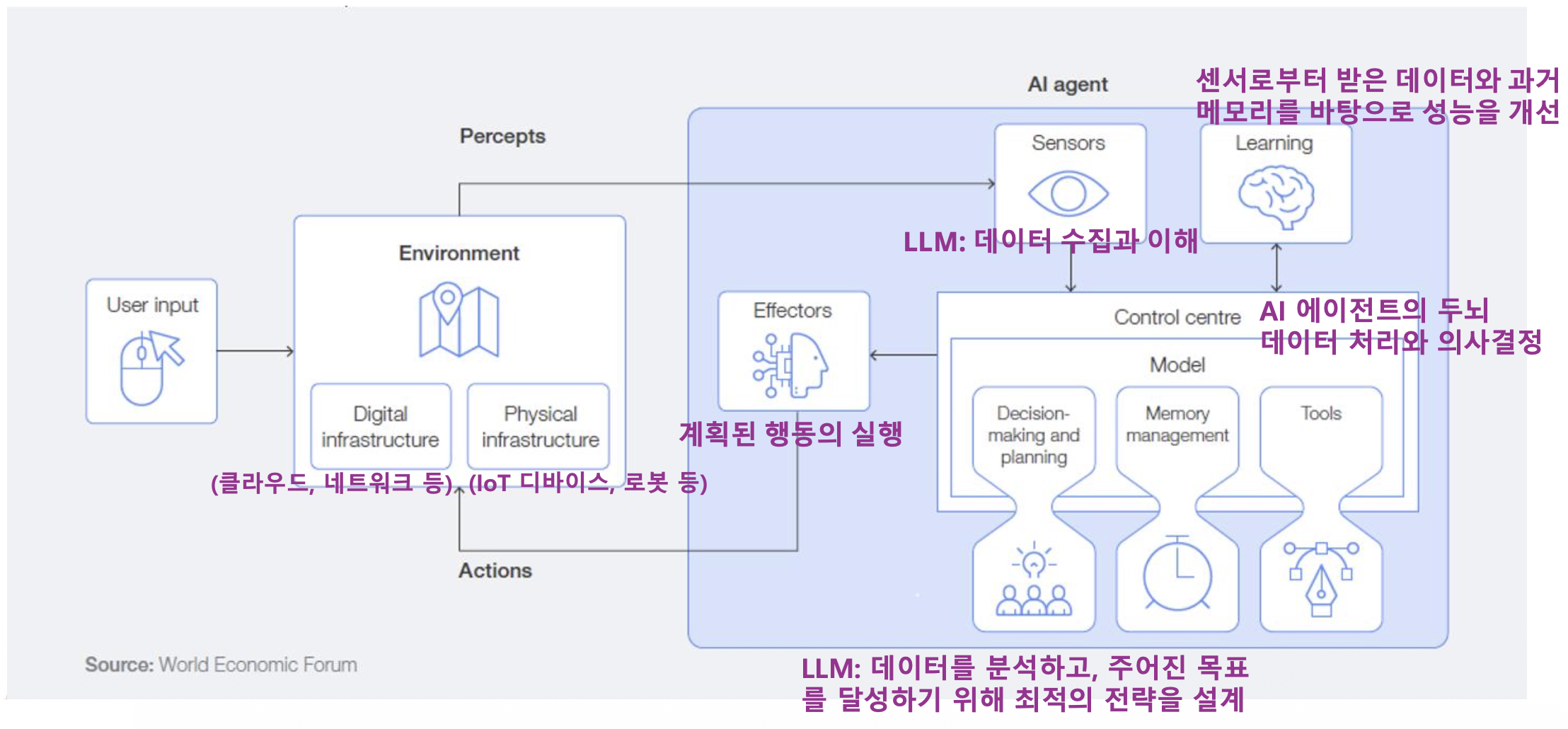
p4. AI 에이전트의 핵심 요소기술
- LLM (Large Language Model)
- 에이전트의 중앙 의사 결정자 및 추론 엔진 역할을 수행
- 추론 (Reasoning) 및 계획 (Planning)
- 복잡한 목표 달성을 위해 필요한 단계들을 스스로 생각하고 계획하는 능력
- 추론: 에이전트가 주어진 정보(프롬프트, 검색 결과, 지식베이스)를 바탕으로 논리적 결론을 도출하거나 문제 해결을 위한 아이디어를 생성
- 계획: 추론을 통해 도출된 아이디어나 목표를 달성하기 위해 필요한 구체적이고 순차적인 행동 단계(Steps)를 수립
- 복잡한 목표 달성을 위해 필요한 단계들을 스스로 생각하고 계획하는 능력
- 도구 사용 (Tool Use / Tool Calling)
- 외부 API, 데이터베이스, 기타 시스템과 상호작용하여 정보를 얻거나 작업을 수행하는 기술
- 메모리 및 컨텍스트 관리
- 장기/단기 메모리를 통해 지속적인 학습 및 상황 인식을 유지하는 기술
- 오케스트레이션 (Orchestration)
- 전체 작업 흐름을 제어하고 관리하여 목표 달성까지 이끄는 기술
- 요청 목적을 해석하고,
- 어떤 도구를 어떤 순서로 사용할지 계획하고,
- 상태를 유지하며 흐름을 제어함
- 전체 작업 흐름을 제어하고 관리하여 목표 달성까지 이끄는 기술
p5. AI 에이전트의 핵심 요소기술
오케스트레이션 패턴 및 프레임워크
- Chain(체인) 기반 오케스트레이션
- 미리 정의된 고정된 순서로 일련의 작업(프롬프트, 도구 호출 등)을 순차적으로 실행
- 선형적인 흐름에 적합
- 장단점: 구현이 단순하고 예측 가능성이 높으나, 유연성이 떨어지며 동적인 상황 변화에 대처하기 어려움
- 프레임워크: LangChain Expression Language (LCEL)
- Agent(에이전트) 기반 오케스트레이션
- LLM이 스스로 추론(Reasoning)하고 계획(Planning)하여 동적으로 다음 행동(Action)을 결정하는 방식으로
ReAct (Reasoning and Acting) 패턴이 대표적 - 높은 자율성과 유연성을 가지며, 복잡하고 예측 불가능한 문제 해결에 적합하나,
비결정적 특성으로 인해 결과의 일관성이 떨어질 수 있음 - 프레임워크: LangChain의 AgentExecutor
- LLM이 스스로 추론(Reasoning)하고 계획(Planning)하여 동적으로 다음 행동(Action)을 결정하는 방식으로
- Graph(그래프) 기반 오케스트레이션
- 작업 흐름을 노드(상태 또는 행동)와 엣지(전환 조건)로 구성된 방향성 그래프로 정의
- 체인 방식보다 유연하고 에이전트 방식보다 흐름 제어가 명시적이어서,
복잡한 워크플로우를 안정적으로 구축 가능 - Reflection(반성)과 Loop(반복) 구현에 매우 강력
- 프레임워크: LangGraph, Microsoft Autogen (멀티 에이전트 협업)
p6. Agentic RAG
Agentic RAG 핵심 구성요소
- Query Analysis
- 사용자의 질문의 의도, 복잡도, 필요 정보를 파악
- Planning (계획 수립)
- 쿼리 분석 결과를 바탕으로 실행 계획을 수립
- 계획 수립 전략
- 선형 계획: 간단한 질문에 적합
- 분기 계획 (Branching Planning): 조건부 실행이 필요한 경우
- 병렬 계획: 독립적인 여러 정보 수집
- Agentic RAG의 핵심 패턴인 ReAct 패턴 활용
- Retrieval (검색)
- 적응형 검색 (Adaptive Retrieval)
- 하이브리드 검색 (Hybrid Search)
- 다단계 검색 (Multi-hop Retrieval)
- Self-Reflection (자기 성찰)
- 수집한 정보의 품질과 충분성을 평가
- 관련성(검색결과가 질문과 관련있는 정도),
완전성(정보가 충분한지),
신뢰성(정보 출처와 신뢰성)
- Tool Use (도구 사용): 다양한 도구 통합
p7. Agentic RAG의 사고 과정
1
2
3
4
5
6
7
8
9
10
11
12
13
14
15
16
17
18
19
20
21
22
23
24
25
26
27
28
29
30
# 의사 코드로 본 Agentic RAG 프로세스

def agentic_rag(query):
    # 1. 질문 분석
    analysis = analyze_query(query)
    # "이 질문은 최신 정보가 필요하고, 수치 비교가 포함"

    # 2. 전략 수립
    strategy = plan_strategy(analysis)
    # "먼저 최신 데이터를 검색하고, 그 다음 계산기를 사용"

    # 3. 단계별 실행
    for step in strategy:
        if step.type == "search":
            results = search(step.query)

            # 4. 결과 평가
            if not is_sufficient(results):
                # 검색 쿼리 수정 후 재시도
                results = search(refine_query(step.query))

        elif step.type == "calculate":
            results = calculator(step.expression)

        # 5. 충분한지 판단
        if has_enough_info():
            break

    # 6. 최종 답변 생성
    return generate_answer(query, collected_info)
p8. Planning: ReAct 패턴 활용
1
2
3
4
5
6
7
8
9
10
11
12
13
14
15
16
17
18
19
20
21
22
23
24
25
26
27
28
29
30
31
32
33
34
35
36
37
38
39
40
41
42
43
class ReActPlanner:
    def __init__(self, llm):
        self.llm = llm

    def plan_next_action(self, query, history, observations):
        prompt = f"""
        현재 상황:
        질문: {query}
        지금까지의 행동: {history}
        관찰 결과: {observations}

        다음에 무엇을 해야 할까요?

        Thought: [추론 과정]
        Action: [search/calculate/aggregate/answer]
        Action Input: [구체적 입력]
        """
        response = self.llm.generate(prompt)
        return self.parse_react_response(response)

    def execute_plan(self, query):
        history = []
        observations = []
        max_iterations = 10

        for i in range(max_iterations):
            # 다음 행동 결정
            action = self.plan_next_action(
                query, history, observations
            )

            if action.type == "answer":
                # 충분한 정보 확보
                return action.content

            # 행동 실행
            result = self.execute_action(action)

            # 기록
            history.append(action)
            observations.append(result)

        return "최대 반복 횟수 도달"
p9. Retrieval (검색) – Adaptive Retrieval
1
2
3
4
5
6
7
8
9
10
11
12
13
14
15
16
17
18
19
20
21
22
23
24
25
26
class AdaptiveRetriever:
    def retrieve(self, query, context=None):
        # 첫 검색
        results = self.initial_search(query)

        # 결과 평가
        quality = self.evaluate_results(results, query)

        if quality < THRESHOLD:
            # 검색 전략 변경
            if quality.issue == "too_broad":
                # 더 구체적으로
                results = self.search(self.make_specific(query))

            elif quality.issue == "outdated":
                # 시간 제약 추가
                results = self.search(
                    f"{query} 2024",
                    filter={"date": "last_6_months"}
                )

            elif quality.issue == "no_results":
                # 쿼리 완화
                results = self.search(self.expand_query(query))

        return results
p10. Retrieval (검색) – 하이브리드 검색 (Hybrid Search)
1
2
3
4
5
6
7
8
9
10
11
12
13
14
15
16
17
18
19
20
21
22
23
24
25
26
27
28
29
30
31
32
33
34
35
class HybridSearcher:
    def __init__(self, vector_db, bm25_index):
        self.vector_db = vector_db
        self.bm25_index = bm25_index

    def search(self, query, alpha=0.5):
        # 의미 검색 (Vector Search)
        semantic_results = self.vector_db.search(query, top_k=20)

        # 키워드 검색 (BM25)
        keyword_results = self.bm25_index.search(query, top_k=20)

        # 점수 결합
        combined = self.reciprocal_rank_fusion(
            semantic_results,
            keyword_results,
            alpha=alpha
        )

        return combined[:10]  # Top 10 반환

    def reciprocal_rank_fusion(self, results1, results2, alpha=0.5):
        """RRF 알고리즘으로 결과 결합"""
        scores = {}
        k = 60  # RRF 상수

        for rank, doc in enumerate(results1):
            scores[doc.id] = scores.get(doc.id, 0) + alpha / (k + rank + 1)

        for rank, doc in enumerate(results2):
            scores[doc.id] = scores.get(doc.id, 0) + (1 - alpha) / (k + rank + 1)

        return sorted(scores.items(),
                      key=lambda x: x[1],
                      reverse=True)
p11. Retrieval (검색) – 다단계 검색 (Multi-hop Retrieval)
1
2
3
4
5
6
7
8
9
10
11
12
13
14
15
16
17
18
19
20
21
22
23
24
class MultiHopRetriever:
    def retrieve(self, query, max_hops=3):
        results = []
        current_query = query

        for hop in range(max_hops):
            # 현재 쿼리로 검색
            hop_results = self.search(current_query)
            results.extend(hop_results)

            # 다음 검색이 필요한지 판단
            need_more = self.assess_information_gap(
                query, results
            )

            if not need_more:
                break

            # 다음 쿼리 생성
            current_query = self.generate_followup_query(
                query, results
            )

        return self.deduplicate_and_rank(results)
p12. 검색 에이전트
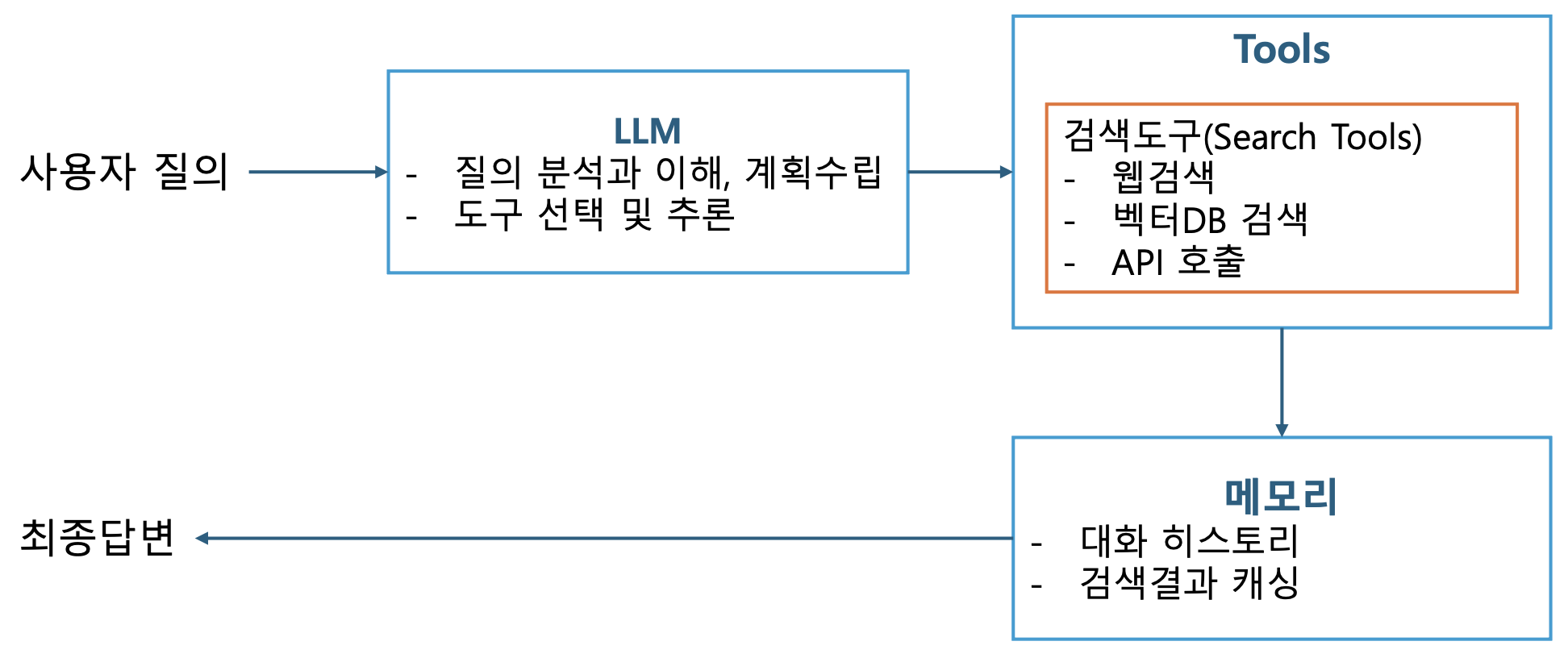
p13. 검색 에이전트
필수 구성요소
- LLM
- OpenAI GPT-4, …
- Anthropic Claude
- Google PaLM
- 오픈소스 모델(Llama, Mistral 등)
- 도구
- 검색도구
- SerpAPI: Google 검색
- DuckDuckGo: 프라이버시 중심 검색
- Wikipedia: 백과사전 정보
- ArXiv: 학술 논문 검색
- 벡터 저장소
- 유틸리티 도구
- Calculator: 수학 계산
- Python REPL: 코드 실행
- Requests: HTTP 요청
- 검색도구
- 메모리
- ConversationBufferMemory: 전체 대화 저장
- ConversationSummaryMemory: 요약 저장
- ConversationBufferWindowMemory: 최근 N개 메시지만 저장
- VectorStoreMemory: 벡터 기반 관련 메모리 검색
p14. LangChain을 이용한 검색 에이전트
- LangChain ?
- LangChain은 대규모 언어 모델(LLM)을 활용한 애플리케이션 개발을 위한 프레임워크
- 핵심 기능
- 프롬프트 관리 및 최적화
- 체인(Chain) 구성을 통한 복잡한 워크플로우 구현
- 데이터 소스 연결 및 통합
- 에이전트를 통한 자율적 작업 수행
- 메모리 관리
p15. LangChain을 이용한 Agent
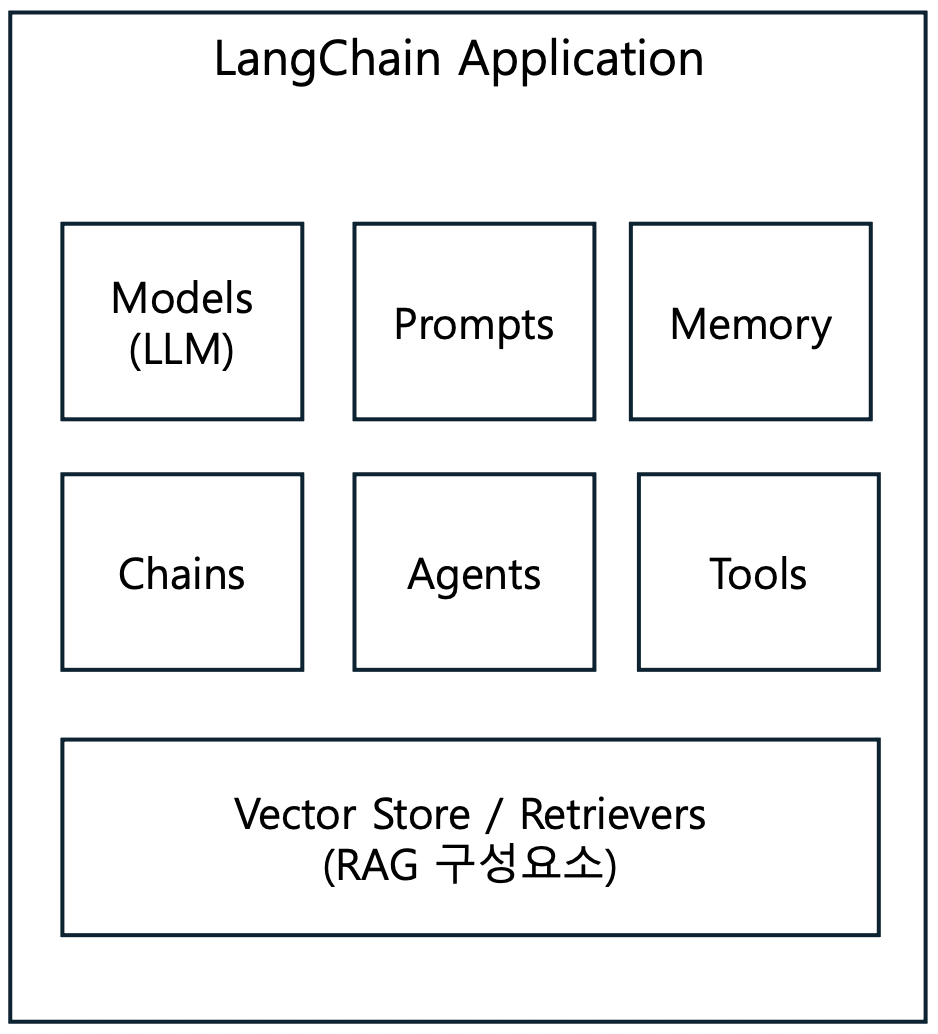
- LangChain 정의
- LangChain은 대규모 언어 모델(LLM)을 활용한 애플리케이션을 쉽게 개발할 수 있도록 돕는 오픈소스 프레임워크
- LangChain의 핵심 가치
- 모듈화 (Modularity)
- 재사용 가능한 컴포넌트들로 구성 (LLM + 프롬프트 + 메모리 + 도구)
- 체인 (Chaining)
- 여러 작업을 순차적으로 연결 (입력 → 처리1 → 처리2 → 처리3 → 출력)
- 에이전트 (Agents)
- LLM이 스스로 판단하고 도구를 선택
- 모듈화 (Modularity)
p16. LangChain을 이용한 Agent
- 구성요소
- Agent: 의사 결정을 담당하는 핵심 컴포넌트
- Tools: 에이전트가 사용할 수 있는 기능들의 집합
- Toolkits: 관련된 도구들의 그룹
- AgentExecutor: 에이전트의 실행을 관리하는 컴포넌트
- 에이전트의 작동 방식
- 입력 수신: 사용자로부터 작업이나 질문 입력
- 계획 수립: 주어진 작업을 완료하기 위한 단계별 계획을 수립
- 도구 선택: 각 단계에 적합한 도구를 선택
- 실행: 선택한 도구를 사용하여 작업을 수행
- 결과 평가: 수행 결과를 평가하고 필요 시 계획을 조정
- 출력 생성: 최종 결과와 답변을 사용자에게 제공
p17. LangChain을 이용한 검색 에이전트
LangChain 개발환경 설정
- 필요 패키지 설치
1
2
3
4
5
6
7
8
9
10
11
# 기본 LangChain 설치
pip install langchain langchain-community langchain-openai

# 검색 도구
pip install google-search-results duckduckgo-search wikipedia

# 벡터 저장소
pip install chromadb faiss-cpu

# 유틸리티
pip install python-dotenv requests beautifulsoup4
- 환경변수 설정
1
2
3
# .env 파일 생성
OPENAI_API_KEY=your_openai_api_key
SERPAPI_API_KEY=your_serpapi_key
p18. LangChain을 이용한 검색 에이전트
- 기본 임포트
1
2
3
4
5
6
7
8
9
from langchain.agents import initialize_agent, Tool, AgentType
from langchain_openai import ChatOpenAI
from langchain.memory import ConversationBufferMemory
from langchain.prompts import MessagesPlaceholder
from dotenv import load_dotenv
import os

# 환경 변수 로드
load_dotenv()
p19. LangChain을 이용한 Agent
LangChain 구성요소
- Models: LLM과 상호작용하는 인터페이스
1
2
3
4
5
6
7
8
9
10
11
12
13
14
15
16
17
18
19
20
21
22
23
24
25
26
27
# OpenAI
from langchain_openai import ChatOpenAI
llm = ChatOpenAI(model="gpt-4", temperature=0.7)

# Anthropic Claude
from langchain_anthropic import ChatAnthropic
llm = ChatAnthropic(model="claude-3-opus-20240229")

# Google
from langchain_google_genai import ChatGoogleGenerativeAI
llm = ChatGoogleGenerativeAI(model="gemini-pro")

# Local models (Ollama)
from langchain_community.llms import Ollama
llm = Ollama(model="llama2")

# 기본 사용
response = llm.invoke("한국의 수도는?")
print(response.content)  # "서울입니다"

# 스트리밍
for chunk in llm.stream("긴 이야기를 들려줘"):
    print(chunk.content, end="", flush=True)

# 배치 처리
questions = ["1+1은?", "서울의 인구는?", "파이썬이란?"]
responses = llm.batch(questions)
p20. LangChain을 이용한 Agent
LangChain 구성요소
- Prompts (프롬프트): LLM에게 전달하는 지시사항 템플릿
1
2
3
4
5
6
7
8
9
10
11
12
13
14
15
16
17
18
19
20
21
22
23
from langchain.prompts import PromptTemplate

# 기본 템플릿
template = """
당신은 {role} 전문가입니다.
다음 질문에 {style} 스타일로 답변해주세요.

질문: {question}

답변:
"""

prompt = PromptTemplate(
    input_variables=["role", "style", "question"],
    template=template
)

# 사용
formatted = prompt.format(
    role="AI",
    style="친절하고 상세한",
    question="머신러닝이란?"
)
1
2
3
4
5
6
7
8
9
10
11
12
13
from langchain.prompts import ChatPromptTemplate

chat_prompt = ChatPromptTemplate.from_messages([
    ("system", "당신은 {domain} 전문가입니다."),
    ("human", "안녕하세요!"),
    ("ai", "안녕하세요! 무엇을 도와드릴까요?"),
    ("human", "{question}")
])

messages = chat_prompt.format_messages(
    domain="프로그래밍",
    question="파이썬 클래스 설명해줘"
)
p22. LangChain을 이용한 Agent
LangChain 구성요소
Memory: 대화 기록 및 컨텍스트 유지
1
2
3
4
5
6
7
8
9
10
11
12
13
14
15
16
17
# ConversationBufferMemory (전체 기록)
from langchain.memory import ConversationBufferMemory

memory = ConversationBufferMemory()

# 대화 저장
memory.save_context(
    {"input": "안녕"},
    {"output": "안녕하세요!"}
)
memory.save_context(
    {"input": "내 이름은 철수야"},
    {"output": "반갑습니다, 철수님!"}
)

# 기록 조회
print(memory.load_memory_variables({}))
1
2
3
4
5
6
7
8
9
10
11
12
13
# ConversationBufferWindowMemory (최근 N개만)
from langchain.memory import ConversationBufferWindowMemory

# 최근 2개 대화만 기억
memory = ConversationBufferWindowMemory(k=2)

memory.save_context({"input": "1"}, {"output": "1"})
memory.save_context({"input": "2"}, {"output": "2"})
memory.save_context({"input": "3"}, {"output": "3"})
memory.save_context({"input": "4"}, {"output": "4"})

# 최근 2개만 로드됨
print(memory.load_memory_variables({}))
1
2
3
4
5
6
7
8
9
10
11
12
13
14
15
16
# ConversationSummaryMemory (요약)
from langchain.memory import ConversationSummaryMemory

# 긴 대화를 요약하여 저장
memory = ConversationSummaryMemory(llm=llm)

# 긴 대화
long_conversation = """
Human: 저는 서울에 사는 개발자입니다.
AI: 반갑습니다!
Human: 파이썬을 주로 사용하고 AI에 관심이 많아요.
AI: 좋은 선택이네요!
"""

# 요약되어 저장
# "서울 거주 개발자, 파이썬 사용, AI 관심"
p23. LangChain을 이용한 Agent
LangChain 구성요소
- Chains: 여러 컴포넌트를 연결하여 작업 흐름 구성
1
2
3
4
5
6
7
8
9
10
11
12
# 기본체인

from langchain.chains import LLMChain

chain = LLMChain(
    llm=llm,
    prompt=prompt,
    memory=memory
)

# 실행
result = chain.run(question="파이썬이란?")
p24. LangChain을 이용한 Agent
LangChain 구성요소
Chains: 여러 컴포넌트를 연결하여 작업 흐름 구성
1
2
3
4
5
6
7
8
9
10
11
12
13
14
15
16
17
18
19
20
21
22
23
24
25
26
27
28
29
30
31
32
# Sequential Chain

from langchain.chains import SimpleSequentialChain

# 체인 1: 주제 생성
chain1 = LLMChain(
    llm=llm,
    prompt=PromptTemplate(
        input_variables=["product"],
        template="다음 제품의 광고 문구를 만들어줘: {product}"
    )
)

# 체인 2: 번역
chain2 = LLMChain(
    llm=llm,
    prompt=PromptTemplate(
        input_variables=["ad_copy"],
        template="다음 문구를 영어로 번역해줘: {ad_copy}"
    )
)

# 연결
overall_chain = SimpleSequentialChain(
    chains=[chain1, chain2],
    verbose=True
)

# 실행
result = overall_chain.run("스마트폰")
# 1. "혁신적인 기술, 당신의 손 안에"
# 2. "Innovative technology in your hands"
1
2
3
4
5
6
7
8
9
10
11
12
13
14
15
16
17
18
19
20
# Router Chain

from langchain.chains.router import MultiPromptChain

# 물리학 프롬프트
physics_template = """당신은 물리학자입니다.
질문: {input}"""

# 수학 프롬프트
math_template = """당신은 수학자입니다.
질문: {input}"""

# 라우터 설정
prompt_infos = [
    {"name": "physics", "description": "물리학 질문", "template": physics_template},
    {"name": "math", "description": "수학 질문", "template": math_template}
]

# 질문에 따라 자동으로 적절한 전문가 선택
chain = MultiPromptChain(...)
p25. LangChain을 이용한 Agent
LangChain 구성요소
Agents: LLM이 스스로 도구를 선택하고 사용
1
2
3
4
5
6
7
8
9
10
11
12
13
14
15
16
17
18
19
20
21
22
23
24
25
26
27
28
29
30
31
32
33
34
35
36
37
38
39
40
41
42
from langchain.agents import initialize_agent, Tool
from langchain.agents import AgentType

# 도구 정의
def search(query):
    return f"{query}에 대한 검색 결과"

def calculate(expression):
    return eval(expression)

tools = [
    Tool(
        name="검색",
        func=search,
        description="정보를 검색할 때 사용. 입력: 검색어"
    ),
    Tool(
        name="계산기",
        func=calculate,
        description="수학 계산을 할 때 사용. 입력: 수식"
    )
]

# 에이전트 초기화
agent = initialize_agent(
    tools=tools,
    llm=llm,
    agent=AgentType.ZERO_SHOT_REACT_DESCRIPTION,
    verbose=True
)

# 실행
result = agent.run("2023년 GDP 성장률에 10을 곱해줘")
result = agent.invoke({"input": "2023년 GDP 성장률에 10을 곱해줘"})

# 에이전트 사고 과정:
# 1. "GDP 성장률을 알아야 해" → 검색 도구 사용
# 2. "검색 결과: 2.3%" 획득
# 3. "2.3 * 10을 계산해야 해" → 계산기 사용
# 4. "결과: 23" → 최종 답변 생성

print(result)  # 출력: 딕셔너리 (상세 정보 포함)
initialize_agent():
LLM, Tools, 에이전트 유형(Agent Type) 등의 매개변수를 바탕으로
완성된 형태의 AgentExecutor를 자동 설정하고 초기화AgentType.ZERO_SHOT_REACT_DESCRIPTION:
프롬프트에 기반한 리액트(ReAct) 방식 에이전트
p26. LangChain을 이용한 Agent
LangChain 구성요소
- Agent를 실행하는 방법
- agent.run(query)
- LangChain의 구버전 실행 메서드
- 에이전트 실행 최종답변만 반환
- 중간과정 확인불가, 메타데이터 접근 불가
- agent.invoke(input)
- LangChain의 현대적 표준 실행 메서드
- 상세한 실행 정보를 딕셔너리로 반환
- 프로덕션 코드 생성 시 사용
- 중간과정 확인 가능
- agent.stream(input)
- 실시간 스트리밍 필요 시 사용
- agent.batch(inputs)
- 배치처리
- agent.ainvoke(input)
- 비동기 실행
- AgentExecutor
1
2
3
# 실시간으로 토큰 스트리밍
for chunk in agent.stream({"input": "질문"}):
    print(chunk, end="", flush=True)
1
2
3
4
5
6
7
8
9
10
11
# 여러 질문을 한 번에 처리
questions = [
    {"input": "질문1"},
    {"input": "질문2"},
    {"input": "질문3"}
]

results = agent.batch(questions)

for result in results:
    print(result["output"])
1
2
3
4
5
6
# 비동기 실행
async def main():
    result = await agent.ainvoke({"input": "질문"})
    print(result["output"])

asyncio.run(main())
- agent.run(query)
p27. LangChain을 이용한 Agent
LangChain 구성요소
- AgentExecutor
- 실제 에이전트 실행 관리 클래스
initialize_agent()가 내부적으로 생성하는 객체- 강력하고 세밀한 제어가 가능
- 커스텀 오류처리
- 복잡한 메모리 관리
- 고급 설정(타임아웃, 반복제한 등)
1
2
3
4
5
6
7
8
9
10
11
12
13
14
15
16
17
18
19
20
21
22
23
24
25
26
27
28
29
30
from langchain.agents import AgentExecutor, create_openai_functions_agent
from langchain_core.prompts import ChatPromptTemplate, MessagesPlaceholder

# 1. 프롬프트 정의
prompt = ChatPromptTemplate.from_messages([
    ("system", "당신은 유능한 AI 어시스턴트입니다."),
    ("human", "{input}"),
    MessagesPlaceholder(variable_name="agent_scratchpad")
])

# 2. 에이전트 생성
agent = create_openai_functions_agent(
    llm=llm,
    tools=tools,
    prompt=prompt
)

# 3. AgentExecutor 생성 (실행 엔진)
agent_executor = AgentExecutor(
    agent=agent,              # 에이전트 객체
    tools=tools,              # 도구 리스트
    verbose=True,             # 실행 과정 출력
    max_iterations=10,        # 최대 반복 횟수
    max_execution_time=60,    # 최대 실행 시간(초)
    early_stopping_method="generate",  # "force" 또는 "generate"
    handle_parsing_errors=True
)

# 4. 실행
result = agent_executor.invoke({"input": "질문"})
p28. LangChain을 이용한 Agent
1
2
3
4
5
6
7
8
9
10
11
12
13
14
15
16
17
18
19
from langchain.agents import initialize_agent, AgentExecutor
from langchain.agents import create_openai_functions_agent
from langchain_openai import ChatOpenAI

llm = ChatOpenAI(temperature=0)
tools = [...]  # 도구 정의

# =========================================
# 방법 1: agent.run() (레거시)
# =========================================
agent1 = initialize_agent(
    tools=tools,
    llm=llm,
    agent=AgentType.ZERO_SHOT_REACT_DESCRIPTION
)

result1 = agent1.run("파이썬이란?")
print(type(result1))  # <class 'str'>
print(result1)        # "파이썬은..."
1
2
3
4
5
6
7
8
9
10
11
12
13
14
# =========================================
# 방법 2: agent.invoke() (권장)
# =========================================
agent2 = initialize_agent(
    tools=tools,
    llm=llm,
    agent=AgentType.ZERO_SHOT_REACT_DESCRIPTION,
    return_intermediate_steps=True
)

result2 = agent2.invoke({"input": "파이썬이란?"})
print(type(result2))           # <class 'dict'>
print(result2["output"])       # "파이썬은..."
print(result2["intermediate_steps"])  # 중간 과정
1
2
3
4
5
6
7
8
9
10
11
12
13
14
15
16
17
18
19
20
21
22
23
24
25
26
27
28
29
30
# =========================================
# 방법 3: AgentExecutor (고급)
# =========================================
from langchain_core.prompts import ChatPromptTemplate, MessagesPlaceholder

prompt = ChatPromptTemplate.from_messages([
    ("system", "당신은 유능한 어시스턴트입니다."),
    ("human", "{input}"),
    MessagesPlaceholder(variable_name="agent_scratchpad")
])

agent_core = create_openai_functions_agent(
    llm=llm,
    tools=tools,
    prompt=prompt
)

agent3 = AgentExecutor(
    agent=agent_core,
    tools=tools,
    verbose=True,
    max_iterations=10,
    return_intermediate_steps=True,
    handle_parsing_errors=True
)

result3 = agent3.invoke({"input": "파이썬이란?"})
print(type(result3))                # <class 'dict'>
print(result3["output"])
print(result3["intermediate_steps"])
p29. LangChain을 이용한 Agent
1
2
3
4
5
6
7
8
9
10
11
12
13
14
15
16
17
18
19
20
21
22
23
24
25
26
27
28
29
30
from langchain.agents import AgentExecutor, create_openai_functions_agent
from langchain.memory import ConversationBufferMemory
from langchain_core.prompts import ChatPromptTemplate, MessagesPlaceholder

# 메모리
memory = ConversationBufferMemory(
    memory_key="chat_history",
    return_messages=True
)

# 프롬프트
prompt = ChatPromptTemplate.from_messages([
    ("system", "당신은 친절한 AI 어시스턴트입니다."),
    MessagesPlaceholder(variable_name="chat_history"),
    ("human", "{input}"),
    MessagesPlaceholder(variable_name="agent_scratchpad")
])

# 에이전트 생성
agent = create_openai_functions_agent(llm, tools, prompt)

# AgentExecutor 생성
agent_executor = AgentExecutor(
    agent=agent,
    tools=tools,
    memory=memory,
    verbose=True,
    max_iterations=10,
    return_intermediate_steps=True
)
1
2
3
4
5
6
7
8
9
10
11
12
# 대화 시작
print("챗봇: 안녕하세요! 무엇을 도와드릴까요?")

while True:
    user_input = input("사용자: ")

    if user_input.lower() in ['quit', 'exit', '종료']:
        print("챗봇: 안녕히 가세요!")
        break

    result = agent_executor.invoke({"input": user_input})
    print(f"챗봇: {result['output']}\n")
p30. LangChain을 이용한 Agent 구현 예시
p31. LangChain을 이용한 Agent
Agent 프롬프트 생성
- chat_history: 이전 대화 내용을 저장하는 변수 (멀티턴을 지원하지 않는다면 생략 가능)
- agent_scratchpad: 에이전트가 임시로 저장하는 변수
- input: 사용자의 입력
1
2
3
4
5
6
7
8
9
10
11
12
13
14
15
16
from langchain_core.prompts import ChatPromptTemplate

# 프롬프트 생성
# 프롬프트는 에이전트에게 모델이 수행할 작업을 설명하는 텍스트를 제공합니다. (도구의 이름과 역할을 입력)
prompt = ChatPromptTemplate.from_messages(
    [
        (
            "system",
            "You are a helpful assistant. "
            "Make sure to use the `search_news` tool for searching keyword related news.",
        ),
        ("placeholder", "{chat_history}"),
        ("human", "{input}"),
        ("placeholder", "{agent_scratchpad}"),
    ]
)
p32. LangChain을 이용한 Agent
Agent Calling Tools
1
2
3
4
5
6
7
8
9
10
11
12
13
14
15
16
17
18
19
20
21
22
23
24
# 도구 생성
@tool
def search_google_news(query: str) -> str:
    """
    구글에서 뉴스를 검색합니다.
    Args: query: 검색할 키워드
    Returns: 검색 결과 URL 리스트 (문자열)
    """
    try:
        # 뉴스 검색을 위해 쿼리 수정
        news_query = f"{query} site:news.google.com OR site:naver.com/news "

        # 구글 검색 수행 (최대 5개 결과)
        search_results = []
        for idx, url in enumerate(search(news_query, num_results=5)):
            search_results.append(f"{idx+1}. {url}")

        if not search_results:
            return "검색 결과가 없습니다."

        return "\n".join(search_results)

    except Exception as e:
        return f"검색 중 오류 발생: {str(e)}"
1
2
3
4
5
6
7
8
9
10
11
12
13
14
15
16
17
18
19
20
21
22
def get_article_content(url: str) -> str:
    """
    뉴스 기사 URL에서 제목 추출합니다.
    Args: url: 뉴스 기사 URL
    Returns: 기사 제목
    """
    try:
        headers = {
            'User-Agent': 'Mozilla/5.0 (Windows NT 10.0; Win64; x64) AppleWebKit/537.36'
        }
        response = requests.get(url, headers=headers, timeout=10)
        response.encoding = 'utf-8'
        soup = BeautifulSoup(response.text, 'html.parser')

        # 제목 추출
        title = soup.find('title')
        title_text = title.get_text().strip() if title else "제목 없음"

        return f"제목: {title_text}\n"

    except Exception as e:
        return f"기사 내용을 가져오는 중 오류 발생: {str(e)}"
1
2
# tools 정의
tools = [search_google_news, get_article_content]
p33. LangChain을 이용한 Agent
Agent Calling Tools
1
2
3
4
5
6
7
8
9
10
11
12
13
14
15
16
17
18
19
20
21
22
23
24
25
26
from langchain.tools import tool
from typing import List, Dict, Annotated
from langchain_teddynote.tools import GoogleNews
from langchain_experimental.utilities import PythonREPL

# 도구 생성
@tool
def search_news(query: str) -> List[Dict[str, str]]:
    """Search Google News by input keyword"""
    news_tool = GoogleNews()
    return news_tool.search_by_keyword(query, k=5)

# 도구 생성
@tool
def python_repl_tool(
    code: Annotated[str, "The python code to execute to generate your chart."]
):
    """Use this to execute python code. If you want to see the output of a value,
    you should print it out with `print(...)`. This is visible to the user."""
    result = ""
    try:
        result = PythonREPL().run(code)
    except BaseException as e:
        print(f"Failed to execute. Error: {repr(e)}")
    finally:
        return result
1
2
# tools 정의
tools = [search_news, python_repl_tool]
p34. LangChain을 이용한 Agent
Agent 생성
1
2
3
4
5
6
7
8
from langchain_openai import ChatOpenAI
from langchain.agents import create_tool_calling_agent

# LLM 정의
llm = ChatOpenAI(model="gpt-4o-mini", temperature=0)

# Agent 생성
agent = create_tool_calling_agent(llm, tools, prompt)
p35. LangChain을 이용한 Agent
AgentExecutor: AgentExecutor는 도구를 사용하는 에이전트를 실행하는 클래스
1
2
3
4
5
6
7
8
9
10
11
12
13
14
15
16
17
from langchain.agents import AgentExecutor

# AgentExecutor 생성
agent_executor = AgentExecutor(
    agent=agent,
    tools=tools,
    verbose=True,
    max_iterations=10,
    max_execution_time=10,
    handle_parsing_errors=True,
)

# AgentExecutor 실행
result = agent_executor.invoke({"input": "AI 투자와 관련된 뉴스를 검색해 주세요."})

print("Agent 실행 결과:")
print(result["output"])
주요 속성
- agent: 실행 루프의 각 단계에서 계획을 생성하고 행동을 결정하는 에이전트
- tools: 에이전트가 사용할 수 있는 유효한 도구 목록
- return_intermediate_steps: 최종 출력과 함께 에이전트의 중간 단계 경로를 반환할지 여부
- max_iterations: 실행 루프를 종료하기 전 최대 단계 수
- max_execution_time: 실행 루프에 소요될 수 있는 최대 시간
- early_stopping_method: 에이전트가 AgentFinish를 반환하지 않을 때 사용한 조기 종료 방법
- “force”: 시간 또는 반복 제한에 도달했음을 알리는 문자열을 반환
- “generate”: 에이전트의 LLM 체인을 마지막으로 호출해 이전 단계에 따라 최종 답변을 생성
- handle_parsing_errors: 에이전트의 출력 파싱 중 발생한 오류를 처리하는 방법
- trim_intermediate_steps: 중간 단계를 트리밍하는 방법 (-1: 트리밍하지 않음, 또는 트리밍 함수)
주요 메서드
- invoke: 에이전트 실행
- stream: 최종 출력에 도달하는 데 필요한 단계를 스트리밍
p36. LangGraph를 이용한 AgentRAG 개발
LangGraph
- LLM 기반 애플리케이션을 그래프 구조로 설계하고 실행할 수 있는 프레임워크
- LangChain 위에 구축되어 있으며, 복잡한 에이전트 워크플로우를 상태 기반 그래프로 표현
왜 LangGraph?
LangChain의 한계점
- 블랙박스: 내부 동작을 제어하기 어려움
- 제한적 흐름: 선형적 실행만 가능
- 복잡한 로직 구현 어려움
- 디버깅 어려움
- 순환 흐름(Cycle) 불가
LangGraph의 장점
- 명시적 제어: 각 단계를 명확히 정의
- 복잡한 흐름: 조건부 분기, 병렬 처리, 순환
- 상태 관리: 중간 상태를 추적하고 수정 가능
- 디버깅 용이: 각 단계별 결과 확인 가능
- 유연성: 사람 개입(Human-in-the-loop) 가능
p37. LangGraph를 이용한 AgentRAG 개발
LangGraph의 핵심 기능
- 그래프 기반 워크플로우 (Graph-Based Workflow)
- 노드(Node)와 엣지(Edge)
- 각 작업 단계(LLM 호출, 도구 사용, 일반 함수 등)를 ‘노드’로 정의하고,
노드 간의 실행 순서를 ‘엣지’로 연결
- 각 작업 단계(LLM 호출, 도구 사용, 일반 함수 등)를 ‘노드’로 정의하고,
- 순환(Cycles) 지원
- 기존 LangChain의 순차적 체인 구조와 달리, 그래프 내에서 루프(반복)를 생성 가능
- 에이전트의 지속적인 추론 및 자기개선 루프, 재시도 로직 구현 가능
- 노드(Node)와 엣지(Edge)
- 세밀한 제어 흐름 (Fine-grained Control Flow)
- 조건부 엣지 (Conditional Edges)
- 특정 조건(예: LLM의 출력 결과)에 따라 다음 실행할 노드를 동적으로 결정
- 복잡한 분기 로직(if/else) 구현 가능
- 상태 관리 (State Management)
- TypedDict 등을 사용해 워크플로우 전반에 걸친 상태(기억)를 유지하고 업데이트
- 여러 단계의 상호작용에서 정보를 잃지 않고 전달
- 조건부 엣지 (Conditional Edges)
- 고급 에이전트 기능 지원
- 지속성 및 내결함성 (Persistence & Fault Tolerance)
- 에이전트의 현재 상태를 저장하고 필요 시 중단된 지점부터 다시 시작 가능
- Human-in-the-Loop (HITL)
- 특정 노드에서 실행을 일시 중지하고 인간의 검토나 입력을 요청할 수 있는 기능 지원
- 멀티 에이전트 시스템
- 여러 개의 에이전트가 협력하여 작업을 수행하는 복잡한 시스템을 구축하기 용이
- 지속성 및 내결함성 (Persistence & Fault Tolerance)
p38. LangGraph를 이용한 AgentRAG 개발
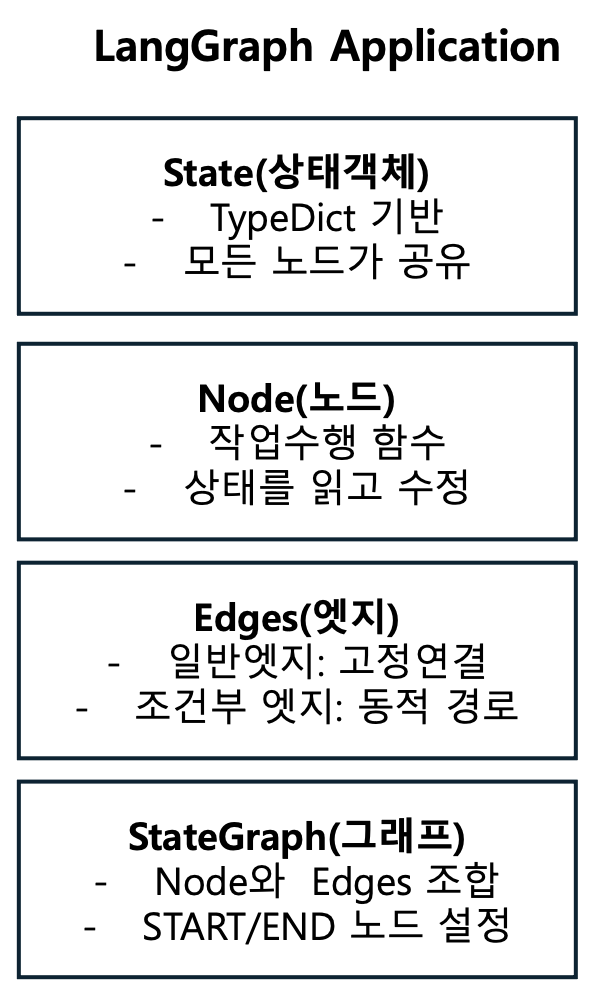
LangGraph의 핵심 구성 요소
- State (상태): 모든 노드가 공유하는 데이터 구조
1
2
3
4
5
6
7
8
9
10
11
12
13
from typing import TypedDict, Annotated, Sequence
from langchain_core.messages import BaseMessage
import operator

class AgentState(TypedDict):
    """에이전트의 상태를 정의"""

    # 대화 메시지 (누적)
    messages: Annotated[Sequence[BaseMessage], operator.add]
    current_step: str  # 현재 단계
    retrieved_docs: list  # 검색된 문서
    answer: str  # 최종 답변
    iteration: int  # 반복 횟수
Python의 TypedDict를 상속받아 정의
- 상태가 정해진 키와 타입을 갖도록 강제
- 코드의 안정성 유지
Annotated: 상태 업데이트 방식 지정
- operator.add: 기존 값에 추가 (리스트, 문자열)
- 기본: 덮어쓰기
1
2
3
4
5
6
7
8
9
10
11
12
13
14
15
16
17
18
19
20
21
22
23
# 초기 상태
state = {
    "messages": [],
    "current_step": "start",
    "iteration": 0
}

# 노드 1 실행 후
state = {
    "messages": [HumanMessage("안녕")],  # 추가됨
    "current_step": "검색",              # 덮어씀
    "iteration": 1                      # 증가
}

# 노드 2 실행 후
state = {
    "messages": [
        HumanMessage("안녕"),
        AIMessage("안녕하세요")         # 추가
    ],
    "current_step": "답변",
    "iteration": 2
}
p39. LangGraph를 이용한 AgentRAG 개발
LangGraph의 핵심 구성 요소
- Nodes (노드): 실제 작업을 수행하는 함수
기본 노드 구조
1
2
3
4
5
6
7
8
9
10
11
12
13
14
15
16
17
18
19
20
21
22
def my_node(state: AgentState) -> AgentState:
    """
    노드 함수

    Args:
        state: 현재 상태

    Returns:
        업데이트된 상태 (딕셔너리 형태)
    """
    # 1. 상태에서 필요한 정보 읽기
    current_step = state["current_step"]
    messages = state["messages"]

    # 2. 작업 수행
    result = do_something(messages)

    # 3. 상태 업데이트 반환
    return {
        "messages": [AIMessage(result)],
        "current_step": "next_step"
    }
p40. LangGraph를 이용한 AgentRAG 개발
검색 노드 예시
1
2
3
4
5
6
7
8
9
10
11
12
13
14
15
16
17
18
19
from langchain_core.messages import HumanMessage, AIMessage

def search_node(state: AgentState) -> AgentState:
    """문서 검색 노드"""

    # 마지막 사용자 질문 추출
    messages = state["messages"]
    question = messages[-1].content

    # 벡터 DB에서 검색
    retriever = vector_store.as_retriever(search_kwargs={"k": 3})
    docs = retriever.get_relevant_documents(question)

    # 상태 업데이트
    return {
        "retrieved_docs": docs,
        "current_step": "검색완료",
        "messages": [AIMessage(f"{len(docs)}개 문서 검색 완료")]
    }
답변 노드 예시
1
2
3
4
5
6
7
8
9
10
11
12
13
14
15
16
17
18
19
20
21
22
23
24
25
26
def generate_node(state: AgentState) -> AgentState:
    """답변 생성 노드"""

    messages = state["messages"]
    docs = state["retrieved_docs"]

    # 문서 내용 결합
    context = "\n\n".join([doc.page_content for doc in docs])

    # 프롬프트 구성
    prompt = f"""
    다음 문서를 참고하여 질문에 답변하세요.
    문서:
    {context}

    질문: {messages[0].content}
    답변:
    """

    # LLM 호출
    response = llm.invoke(prompt)
    return {
        "answer": response.content,
        "current_step": "완료",
        "messages": [AIMessage(response.content)]
    }
p41. LangGraph를 이용한 AgentRAG 개발
LangGraph의 핵심 구성 요소
- Edges (엣지): 노드 간 연결을 정의
일반 엣지 (Normal Edge)
1
2
3
4
5
6
7
8
9
10
# 항상 A → B로 이동
graph.add_edge("A", "B")

workflow = StateGraph(AgentState)

workflow.add_node("검색", search_node)
workflow.add_node("생성", generate_node)

# 검색 후 항상 생성으로 이동
workflow.add_edge("검색", "생성")
조건부 엣지 (Conditional Edge)
1
2
3
4
5
6
7
8
9
10
11
12
13
14
15
16
17
18
19
def decide_next(state: AgentState) -> str:
    """다음 노드 결정"""
    if state["iteration"] > 3:
        return "종료"
    elif state["retrieved_docs"]:
        return "생성"
    else:
        return "검색"

workflow.add_conditional_edges(
    "평가",          # 출발 노드
    decide_next,     # 결정 함수
    {
        "검색": "search_node",
        "생성": "generate_node",
        "종료": END
    }
)
p42. LangGraph를 이용한 AgentRAG 개발
LangGraph의 핵심 구성 요소
- StateGraph (상태 그래프)
- 노드와 엣지를 조합한 실행 가능한 그래프
특수 노드: START와 END
1
2
3
4
5
6
7
8
9
from langgraph.graph import START, END

# START: 진입점 (가상 노드)
workflow.set_entry_point("first_node")
# 또는
workflow.add_edge(START, "first_node")

# END: 종료점 (가상 노드)
workflow.add_edge("last_node", END)
1
2
3
4
5
6
7
8
9
10
11
12
13
14
15
16
17
18
19
20
21
22
23
24
25
from langgraph.graph import StateGraph, END

# 1. 그래프 생성
Workflow = StateGraph(AgentState)

# 2. 노드 추가
Workflow.add_node("node1", node1_function)
Workflow.add_node("node2", node2_function)
Workflow.add_node("node3", node3_function)

# 3. 엣지 추가
workflow.add_edge("node1", "node2")
workflow.add_conditional_edges("node2", decide_function, {...})

# 4. 시작점 설정
workflow.set_entry_point("node1")

# 5. 종료점 설정
workflow.add_edge("node3", END)

# 6. 컴파일
app = workflow.compile()

# 7. 실행
result = app.invoke({"messages": [HumanMessage("안녕")]})
p43. LangGraph를 이용한 AgentRAG 개발
LangGraph의 주요 기능
- 순환(Cycles): 동일 노드를 반복 실행
1
2
3
4
5
6
7
8
9
10
11
12
13
14
15
16
17
18
def improve_node(state: AgentState) -> AgentState:
    """답변을 개선하는 노드"""

    iteration = state.get("iteration", 0)
    answer = state.get("answer", "")

    if iteration >= 3:
        # 최대 반복 도달
        return {"current_step": "완료"}

    # 답변 개선
    improved = llm.invoke(f"다음 답변을 더 나아지게 개선: {answer}")

    return {
        "answer": improved.content,
        "iteration": iteration + 1,
        "current_step": "개선중"
    }
1
2
3
4
5
6
7
8
9
10
11
12
13
14
15
16
17
def should_continue(state: AgentState) -> str:
    """계속할지 결정"""
    if state["iteration"] >= 3:
        return "완료"
    else:
        return "개선"

# 순환 그래프
workflow.add_node("개선", improve_node)
workflow.add_conditional_edges(
    "개선",
    should_continue,
    {
        "개선": "개선",   # 자기 자신으로 순환
        "완료": END
    }
)
p44. LangGraph를 이용한 AgentRAG 개발
LangGraph의 주요 기능
- 병렬 처리 (Parallel Execution)
1
2
3
4
5
6
7
8
9
10
11
12
13
from langgraph.graph import StateGraph

def search_web(state):
    """웹 검색"""
    return {"web_results": "..."}

def search_db(state):
    """DB 검색"""
    return {"db_results": "..."}

def search_vector(state):
    """벡터 DB 검색"""
    return {"vector_results": "..."}
1
2
3
4
5
6
7
8
9
10
11
12
13
14
15
# 병렬 실행
workflow.add_node("웹검색", search_web)
workflow.add_node("DB검색", search_db)
workflow.add_node("벡터검색", search_vector)

# 모두 병렬로 실행
workflow.add_edge(START, "웹검색")
workflow.add_edge(START, "DB검색")
workflow.add_edge(START, "벡터검색")

# 결과 통합
workflow.add_node("통합", combine_results)
workflow.add_edge("웹검색", "통합")
workflow.add_edge("DB검색", "통합")
workflow.add_edge("벡터검색", "통합")
p45. LangGraph를 이용한 AgentRAG 개발
LangGraph의 주요 기능
- 체크포인트 (Checkpointing): 중간 상태 저장 및 복구
1
2
3
4
5
6
7
8
9
10
11
12
13
14
15
16
17
18
from langgraph.checkpoint.sqlite import SqliteSaver

# 영구 저장소
memory = SqliteSaver.from_conn_string("./checkpoints.db")

app = workflow.compile(checkpointer=memory)

# 실행 (자동 저장)
config = {"configurable": {"thread_id": "conversation-1"}}
result = app.invoke(initial_state, config)

# 나중에 이어서 실행
result = app.invoke({"messages": [HumanMessage("계속")]}, config)

# 특정 시점으로 되돌리기
state_history = app.get_state_history(config)
for state in state_history:
    print(state)
p47. LangChain을 이용한 검색 에이전트 핵심 기능 구현 예시
간단한 검색 에이전트
1
2
3
4
5
6
7
8
9
10
11
12
13
14
15
16
17
18
19
20
21
22
23
24
25
26
27
28
from langchain.agents import load_tools, initialize_agent, AgentType
from langchain_openai import ChatOpenAI

# LLM 초기화
llm = ChatOpenAI(
    model="gpt-4",
    temperature=0
)

# 도구 로드
tools = load_tools(
    ["serpapi", "llm-math"],
    llm=llm
)

# 에이전트 초기화
agent = initialize_agent(
    tools=tools,
    llm=llm,
    agent=AgentType.ZERO_SHOT_REACT_DESCRIPTION,
    verbose=True
)

# 실행
response = agent.run(
    "2024년 노벨 물리학상 수상자는 누구이며, 그들의 주요 업적은 무엇인가요?"
)
print(response)
p48. LangChain을 이용한 검색 에이전트 핵심 기능 구현 예시
커스텀 검색 도구 생성
1
2
3
4
5
6
7
8
9
10
11
12
13
14
15
16
17
18
19
20
21
22
23
24
25
26
27
from langchain.tools import Tool
from langchain.utilities import DuckDuckGoSearchAPIWrapper

# DuckDuckGo 검색 래퍼
search = DuckDuckGoSearchAPIWrapper()

# 커스텀 도구 정의
search_tool = Tool(
    name="웹검색",
    func=search.run,
    description="최신 정보나 실시간 데이터가 필요할 때 유용합니다. "
                "뉴스, 날씨, 최신 이벤트 등을 검색할 수 있습니다."
)

# Wikipedia 도구
from langchain.utilities import WikipediaAPIWrapper
wikipedia = WikipediaAPIWrapper()

wiki_tool = Tool(
    name="위키피디아",
    func=wikipedia.run,
    description="역사적 사실, 인물 정보, 개념 설명 등 "
                "검증된 백과사전 정보가 필요할 때 사용합니다."
)

# 도구 리스트
tools = [search_tool, wiki_tool]
1
2
# llm 모델이 tool을 호출할 수 있도록 하려면 도구 바인딩
llm_with_tools = llm.bind_tools(tools)
p49. LangChain을 이용한 검색 에이전트 핵심 기능 구현 예시
메모리를 포함한 에이전트
1
2
3
4
5
6
7
8
9
10
11
12
13
14
15
16
17
18
19
20
21
22
23
24
25
26
27
from langchain.memory import ConversationBufferMemory
from langchain.prompts import MessagesPlaceholder

# 메모리 초기화
memory = ConversationBufferMemory(
    memory_key="chat_history",
    return_messages=True
)

# 에이전트 생성
agent = initialize_agent(
    tools=tools,
    llm=llm,
    agent=AgentType.CHAT_CONVERSATIONAL_REACT_DESCRIPTION,
    memory=memory,
    verbose=True,
    agent_kwargs={
        "memory_prompts": [
            MessagesPlaceholder(variable_name="chat_history")
        ],
        "input_variables": ["input", "agent_scratchpad", "chat_history"]
    }
)

# 대화형 실행
print(agent.run("파이썬이 언제 만들어졌나요?"))
print(agent.run("그 언어의 창시자는 누구인가요?"))  # 이전 맥락 기억
p50. LangChain을 이용한 검색 에이전트 핵심 기능 구현 예시
벡터 저장소를 활용한 RAG 에이전트
1
2
3
4
5
6
7
8
9
10
11
12
13
14
15
16
17
18
19
20
21
22
23
24
25
26
27
28
29
30
31
32
33
34
35
from langchain.vectorstores import Chroma
from langchain.embeddings import OpenAIEmbeddings
from langchain.text_splitter import RecursiveCharacterTextSplitter
from langchain.document_loaders import TextLoader
from langchain.chains import RetrievalQA

# 문서 로드 및 분할
loader = TextLoader("knowledge_base.txt")
documents = loader.load()

text_splitter = RecursiveCharacterTextSplitter(
    chunk_size=1000,
    chunk_overlap=200
)
texts = text_splitter.split_documents(documents)

# 벡터 저장소 생성
embeddings = OpenAIEmbeddings()
vectorstore = Chroma.from_documents(
    documents=texts,
    embedding=embeddings,
    persist_directory="./chroma_db"
)

# 검색 도구 생성
retriever = vectorstore.as_retriever(search_kwargs={"k": 3})

knowledge_tool = Tool(
    name="지식베이스",
    func=RetrievalQA.from_chain_type(
        llm=llm,
        retriever=retriever
    ).run,
    description="내부 문서나 지식베이스에서 정보를 검색할 때 사용합니다."
)
p51. LangChain을 이용한 검색 에이전트 핵심 기능 구현 예시
커스텀 에이전트 타입
1
2
3
4
5
6
7
8
9
10
11
12
13
14
15
16
17
18
19
20
21
22
23
24
25
26
from langchain.agents import BaseSingleActionAgent
from langchain.schema import AgentAction, AgentFinish

class CustomSearchAgent(BaseSingleActionAgent):
    """커스텀 검색 에이전트"""

    tools: list
    llm: ChatOpenAI

    def plan(self, intermediate_steps, **kwargs):
        """다음 행동 계획"""
        # 커스텀 로직 구현
        user_input = kwargs["input"]

        # LLM을 사용한 의사결정
        # …

        return AgentAction(
            tool="웹검색",
            tool_input=user_input,
            log="검색을 수행합니다."
        )

    @property
    def input_keys(self):
        return ["input"]
p52. LangChain을 이용한 검색 에이전트 핵심 기능 구현 예시
에이전트 체인 구성
1
2
3
4
5
6
7
8
9
10
11
12
13
14
15
16
17
18
19
20
21
22
23
24
25
26
27
28
29
30
31
32
33
34
35
36
from langchain.chains import SequentialChain, LLMChain
from langchain.prompts import PromptTemplate

# 1단계: 질의 분석 체인
analysis_template = """
다음 질문을 분석하여 필요한 정보를 파악하세요:
질문: {question}

분석 결과:
"""
analysis_chain = LLMChain(
    llm=llm,
    prompt=PromptTemplate(template=analysis_template, input_variables=["question"]),
    output_key="analysis"
)

# 2단계: 검색 전략 수립 체인
strategy_template = """
분석 결과를 바탕으로 검색 전략을 수립하세요:
분석: {analysis}

검색 전략:
"""
strategy_chain = LLMChain(
    llm=llm,
    prompt=PromptTemplate(template=strategy_template, input_variables=["analysis"]),
    output_key="strategy"
)

# 순차 체인 구성
chain = SequentialChain(
    chains=[analysis_chain, strategy_chain],
    input_variables=["question"],
    output_variables=["analysis", "strategy"],
    verbose=True
)